Free menu bar app for Mac
Put your PC back in your Mac's Screen Mirroring list.
Some networks carry your Mac's search to the PC but never carry the answer back, so a PC running Castpane never shows up. Castpane Link is a small, free menu bar app that asks the PC to announce itself straight to your Mac. Then you mirror the usual way.
Free. macOS 13 Ventura or later. Works together with Castpane for Windows.
Who needs it
You only need Castpane Link when your Mac does not list your PC in Screen Mirroring while Castpane is running. That usually happens on:
Office, school and campus Wi-Fi
Managed networks often filter the discovery traffic that receivers use to announce themselves, sometimes in one direction only.
Mesh systems and Wi-Fi extenders
Some of them pass your Mac's search on to the PC but drop the PC's answer on the way back.
Your iPhone sees the PC, your Mac doesn't
A typical sign of one-way discovery. The PC is fine; its announcements just never reach the Mac.
If your Mac already shows the PC, you do not need it. iPhone and iPad cannot use a helper like this, because iOS does not let apps add receivers to Screen Mirroring. For them, follow the connection guide.
How it works
-
It finds your PC
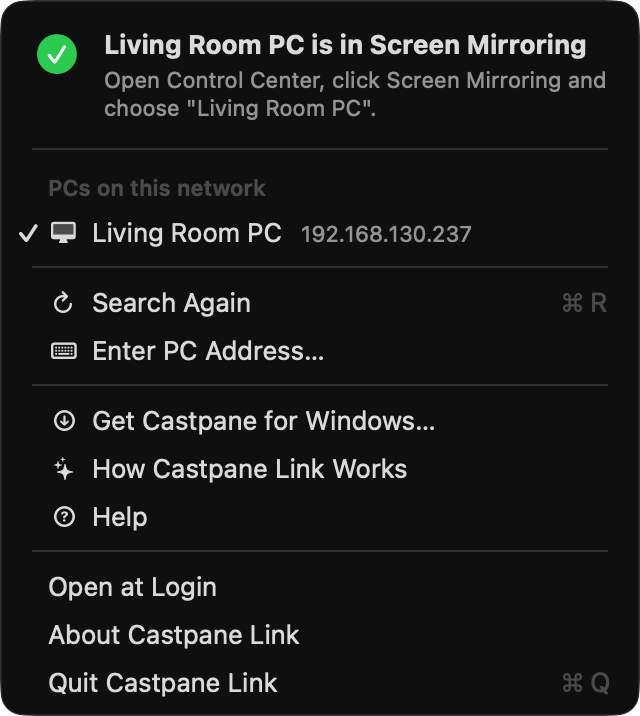
If your Mac already sees the PC, it does nothing. Otherwise it looks for PCs running Castpane on your local network, usually within a few seconds. You can also type the PC's IP address.
-
It asks the PC to announce itself to this Mac
Castpane on the PC then sends its announcements directly to your Mac instead of only to the whole network, and Castpane Link keeps renewing that request while it runs.
-
You mirror as usual
Open Control Center, click Screen Mirroring and pick your PC. Video and sound go straight from macOS to the PC; Castpane Link never handles them.
Set it up once
- Remembers your PC and reconnects when it starts, after sleep and when you change networks.
- Can open at login, so your PC is in the list whenever you need it.
- Lives in the menu bar. No Dock icon, no window in the way.
- Shows when your PC is visible in Screen Mirroring, so you know it worked.
Private by design
No account
Nothing to sign up for and nothing to log in to.
Stays on your local network
It only talks to the Castpane PC on your local network, and only to private local addresses. It never connects to the internet.
Collects nothing
No analytics and no tracking. The only things it sends to your PC are the request to be announced to and, optionally, your Mac's name so the PC can show who asked.
Details are in the privacy policy.
Made for Castpane for Windows
Castpane Link is a companion app and does nothing on its own. Your PC needs Castpane, the screen mirroring receiver for Windows, running on the same network. Castpane shows your Mac, iPhone or iPad in a normal window with sound, and has a connection wizard for when a device cannot see the PC.
Details
- Requires
- macOS 13 Ventura or later
- Build
- Universal (Apple silicon and Intel)
- Price
- Free
- Get it from
- Mac App Store, or a disk image notarized by Apple
- Works with
- Castpane on a Windows 10 or 11 PC on the same network
Questions
Is Castpane Link really free?
Yes. Castpane Link is free and there is nothing to buy inside it. Castpane for Windows is the paid part, and it has a free trial.
Does it work on hotel or guest Wi-Fi?
Only if the network lets devices reach each other. Many guest networks use client isolation, which blocks all traffic between devices, and no helper can get past that. A phone hotspot is the usual way out. See guest networks.
Why does macOS ask about the local network?
On macOS 15 Sequoia and later, apps need your permission to find devices on your local network. Castpane Link needs it to reach your PC, so click Allow. The setup guide shows how to change it later.
Do I need it on my iPhone or iPad?
No, and there is no version for iOS, because iOS does not let apps add receivers to Screen Mirroring. If your iPhone or iPad cannot see the PC, follow this guide.
Get Castpane Link
Free for macOS 13 or later. Pair it with Castpane on your Windows PC.